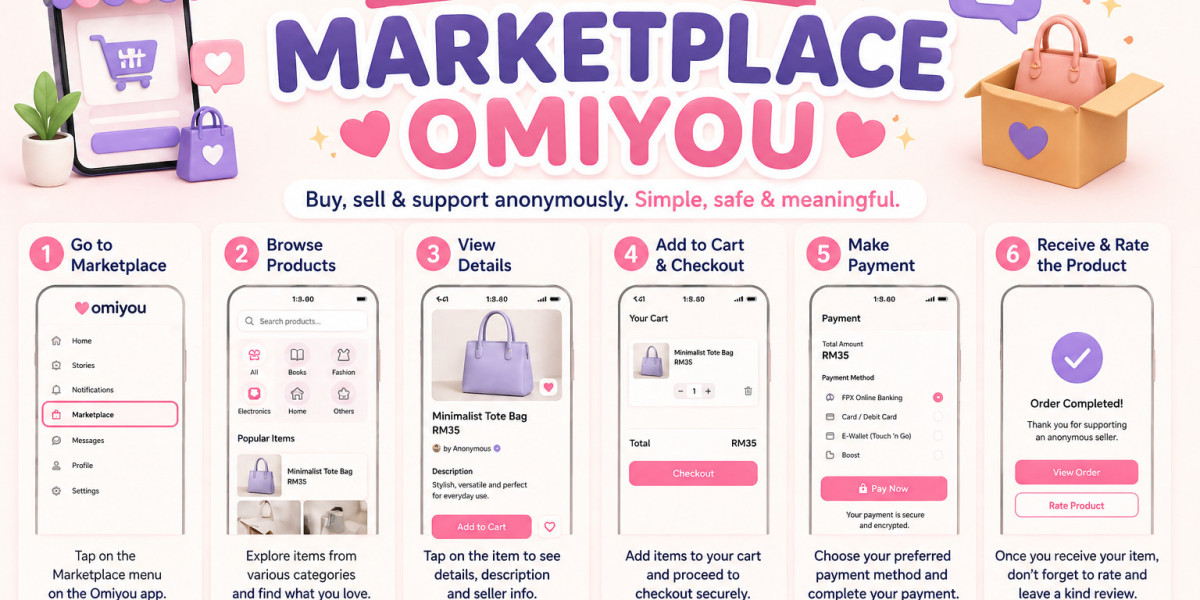

Whether you want to shop for products, sell your own items, or complete secure payments, Omiyou offers a smooth and user-friendly shopping experience.
In this article, we will guide you on how to use Omiyou Marketplace easily and safely.
What Is Omiyou Marketplace?
Omiyou Marketplace is a dedicated section within the Omiyou platform where users can buy and sell a wide range of products such as fashion items, accessories, electronics, home essentials, and much more.
The platform is built with a strong focus on:
- easy user experience
- secure transactions
- clean product display
- fast payment process
- trusted buyer and seller community
With its modern and responsive design, you can access it from both mobile devices and desktop computers.
1. How to Access Omiyou Marketplace
To start using Omiyou Marketplace, first log in to your account.
Once logged in:
- Click on the Marketplace menu
- Choose your preferred product category
- Start browsing products
Available categories may include:
- Electronics
- Fashion
- Bags & Accessories
- Home Products
- Others
This section is designed to help users find products quickly and easily.
2. How to Search for Products
Use the search bar at the top of the page to find the products you need.
Examples of search keywords:
- women’s handbags
- smartphones
- men’s shoes
- computer accessories
You can also filter products by:
- price
- category
- seller location
- popular items
This helps you find the most suitable product based on your needs.
3. How to View Product Details
Once you find a product you like, click on the product image or product name.
On the product page, you will see:
- product name
- price
- product images
- full description
- seller information
- available stock
Always read the product details carefully before making a purchase.
This helps ensure you fully understand what you are buying.
4. How to Add Items to Cart
If you wish to purchase the item, click the Add to Cart button.
The item will be saved in your shopping cart, and you may continue shopping for more products before checking out.
This feature makes it easy to purchase multiple items in a single transaction.
5. How to Checkout and Make Payment
After selecting your products, go to the Cart section.
Review the following:
- product name
- quantity
- total price
- shipping fee (if applicable)
Then click Checkout.
Choose your preferred payment method such as:
- online banking
- debit / credit card
- e-wallet
Finally, click Pay Now to complete your purchase.
6. How to Rate the Product and Seller
After receiving your order, it is recommended to leave a rating and review.
This helps other buyers make better purchasing decisions.
For example:
Fast delivery and excellent product quality.
Positive reviews also help sellers build trust and credibility.
Why Choose Omiyou Marketplace?
Why do users choose Omiyou Marketplace?
- easy to use
- modern interface
- fast purchasing process
- secure payment system
- mobile and desktop friendly
- user-focused design
The platform is ideal for both buyers and sellers looking for a smooth shopping experience.
Conclusion
Omiyou Marketplace makes online shopping and selling simple and convenient.
With just a few easy steps, you can browse products, complete secure payments, and receive your items safely.
Start using Omiyou Marketplace today and enjoy a better shopping experience.