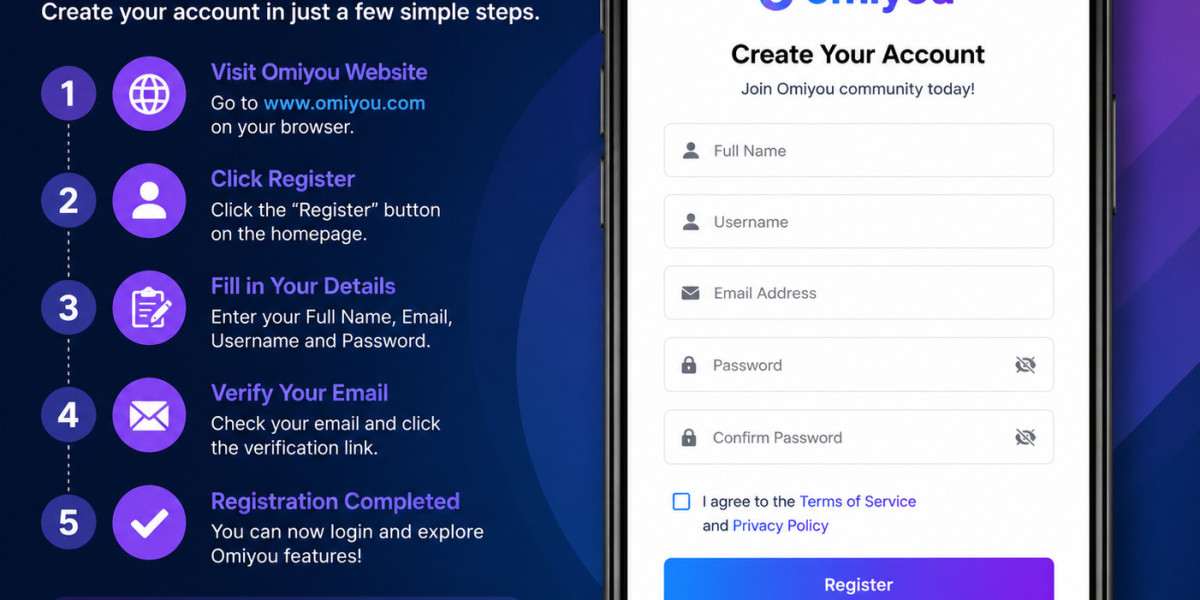

Step 1: Visit the Official Omiyou Website
Open your preferred web browser and navigate to the official Omiyou website.
Make sure you are visiting the correct website to ensure your account information remains secure.
Step 2: Click the "Register" Button
On the homepage, locate and click the "Register" button.
This will take you to the account registration page.
Step 3: Fill in Your Details
Complete the registration form by providing the required information, including:
- Full Name
- Username
- Email Address
- Password
- Confirm Password
Be sure to use a valid email address, as it will be needed for account verification.
Step 4: Agree to the Terms and Conditions
Before proceeding, check the box indicating that you agree to:
- Terms of Service
- Privacy Policy
It's always a good idea to read these policies before creating an account.
Step 5: Click "Register"
After entering your information and reviewing the details, click the "Register" button to submit your registration.
Step 6: Verify Your Email Address
Once registration is complete, Omiyou will send a verification email to the address you provided.
Open your inbox and click the verification link contained in the email.
If you don't see the email, check your Spam or Junk folder.
Step 7: Log In to Your Account
After verifying your email, you can log in using:
- Your Username or Email Address
- Your Password
Congratulations! Your Omiyou account is now active and ready to use.
What Can You Do After Registering?
Once your account is created, you can:
✅ Complete your profile
✅ Upload a profile picture
✅ Create your first post
✅ Join communities and groups
✅ Connect with other users
✅ Explore various features available on the platform
Final Thoughts
Registering for an Omiyou account is a simple process designed for users of all experience levels. In just a few steps, you can become part of a global digital community where you can share content, interact with others, and discover new opportunities online.
Whether you're looking to expand your network, engage with communities, or share your ideas, getting started with Omiyou is easier than ever.
Have you already joined Omiyou? Share your experience and tips in the comments to help new users get started!
#Omiyou #OmiyouRegistration #HowToRegister #SocialMediaPlatform #OnlineCommunity #DigitalNetworking #Technology #BeginnerGuide #OmiyouTutorial #CreateAccount