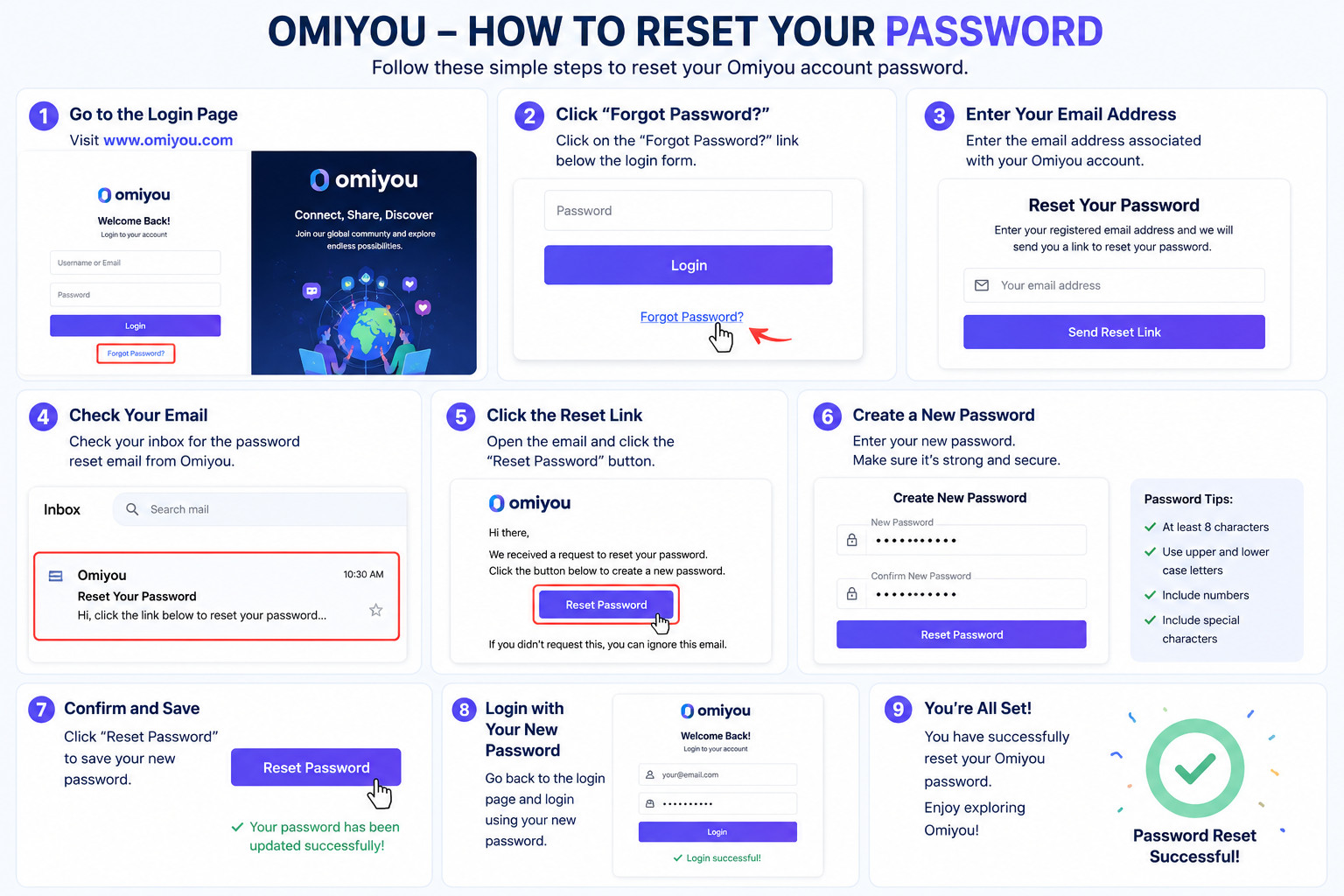
How to Reset Your Omiyou Password: A Simple Step-by-Step Guide
Forgot your Omiyou password? Don't worry. Losing access to your account can happen to anyone, and fortunately, resetting your password is a quick and straightforward process.
This guide will walk you through the steps to regain access to your Omiyou account.
Step 1: Visit the Omiyou Login Page
Go to the Omiyou login page using your web browser.
Once you're on the login screen, look for the "Forgot Password?" option below the login form.
Step 2: Click "Forgot Password?"
Click on the "Forgot Password?" link to begin the password recovery process.
You will be redirected to the password reset page.
Step 3: Enter Your Registered Email Address
Type the email address associated with your Omiyou account.
Make sure you enter the correct email address that was used during registration.
Step 4: Submit Your Request
Click the "Send Reset Link" or "Submit" button.
Omiyou will send a password reset email to your registered email address.
Step 5: Check Your Email Inbox
Open your email inbox and look for the password reset message from Omiyou.
If you don't see it within a few minutes, check your:
Spam Folder
Junk Mail Folder
Promotions Folder
Step 6: Click the Password Reset Link
Open the email and click the password reset link provided.
This link will take you to a secure page where you can create a new password.
Step 7: Create a New Password
Choose a strong and secure password that includes:
Uppercase letters
Lowercase letters
Numbers
Special characters
Example:
✅ StrongPassword123!
❌ password123
Step 8: Confirm Your New Password
Re-enter your new password to confirm it.
Click "Save" or "Reset Password" to complete the process.
Step 9: Log In to Your Account
Return to the login page and sign in using your new password.
You should now have full access to your Omiyou account again.
Tips for Keeping Your Account Secure
✔ Use a unique password for Omiyou
✔ Avoid sharing your login details with others
✔ Update your password regularly
✔ Enable additional security features if available
✔ Keep your email account secure
Final Thoughts
Forgetting your password doesn't mean losing access to your account. By following these simple steps, you can quickly reset your Omiyou password and get back to enjoying the platform.
If you continue experiencing login issues after resetting your password, consider contacting Omiyou's support team for further assistance.
#omiyou #forgotpassword #passwordreset #omiyouguide #accountrecovery #techtips #onlinesecurity #omiyoututorial #socialmediaplatform #helpguide